New Holland540 vs 540E PTO: The Difference and When to Use Each
New Holland540 vs 540E PTO: The Difference and When to Use Each
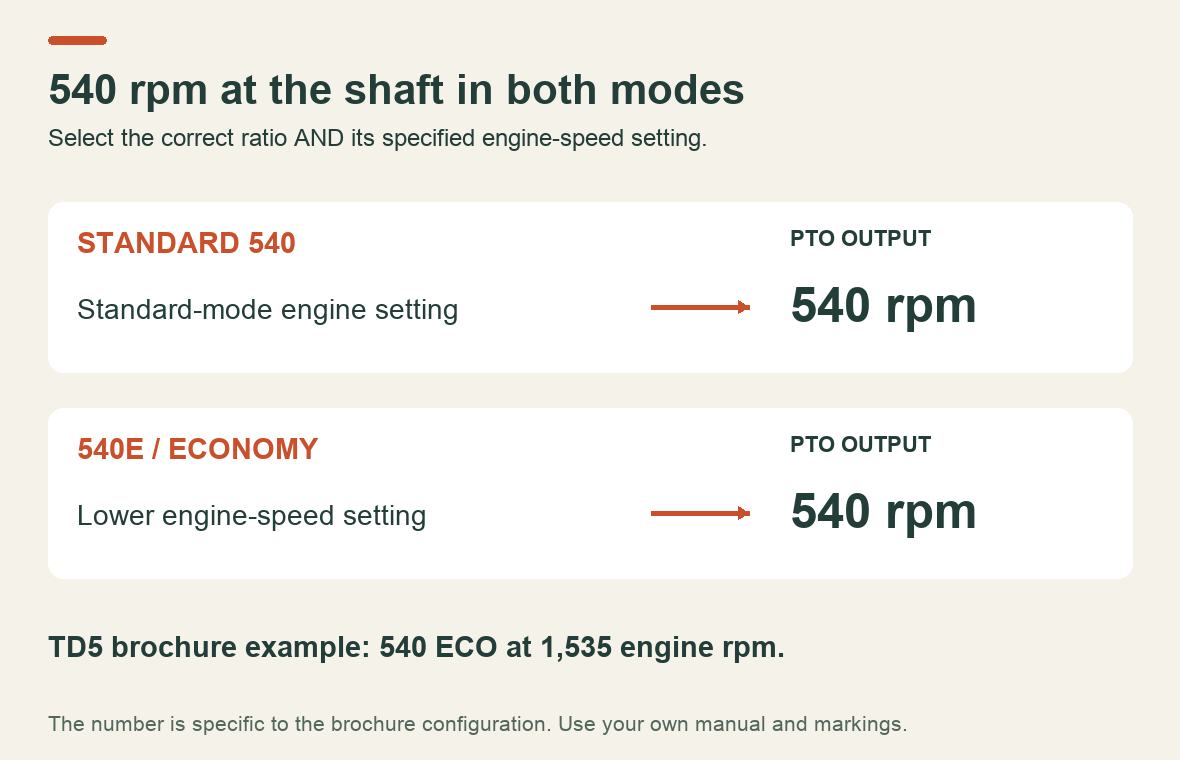
540 and 540E both deliver 540 rpm at the PTO shaft when the engine is set correctly. The difference is the engine speed needed to get there. Economy mode uses a different ratio so the engine can run more slowly during suitable lighter work. It does not turn a 540-rpm implement into a slower-running implement.
That answers the label question. Choosing the setting takes another check: does the tractor have enough power at that lower engine speed for the job in front of it?
540, 540E and 1000 PTO compared
| Setting | Intended shaft speed | What changes | Main check |
|---|---|---|---|
| Standard 540 | 540 rpm | Uses the standard 540 ratio and its specified engine speed | Match the implement's speed and power requirements |
| 540E / 540 ECO | 540 rpm | Reaches that shaft speed at a lower engine speed | Confirm economy mode is permitted and the load is suitable |
| 1000 | 1,000 rpm | A different nominal shaft speed | Use only with equipment specified for this speed and the correct driveline |
The actual engine rpm, selection procedure and power limitations must come from your tractor's manual. The New Holland examples below show why a setting remembered from a different machine is not enough.
What engine rpm should you use?
Read the marking or PTO speed table for the selected mode. 540 is a shaft speed, not an instruction to set the engine to 540 rpm.
For a documented New Holland example, the TD5 brochure, page 15, gives 1,535 engine rpm for its 540 ECO option. The same passage describes reduced fuel consumption and cab noise. That number belongs to the configuration in that brochure. It is not a setting for every TD5, T5000, Boomer or other tractor.
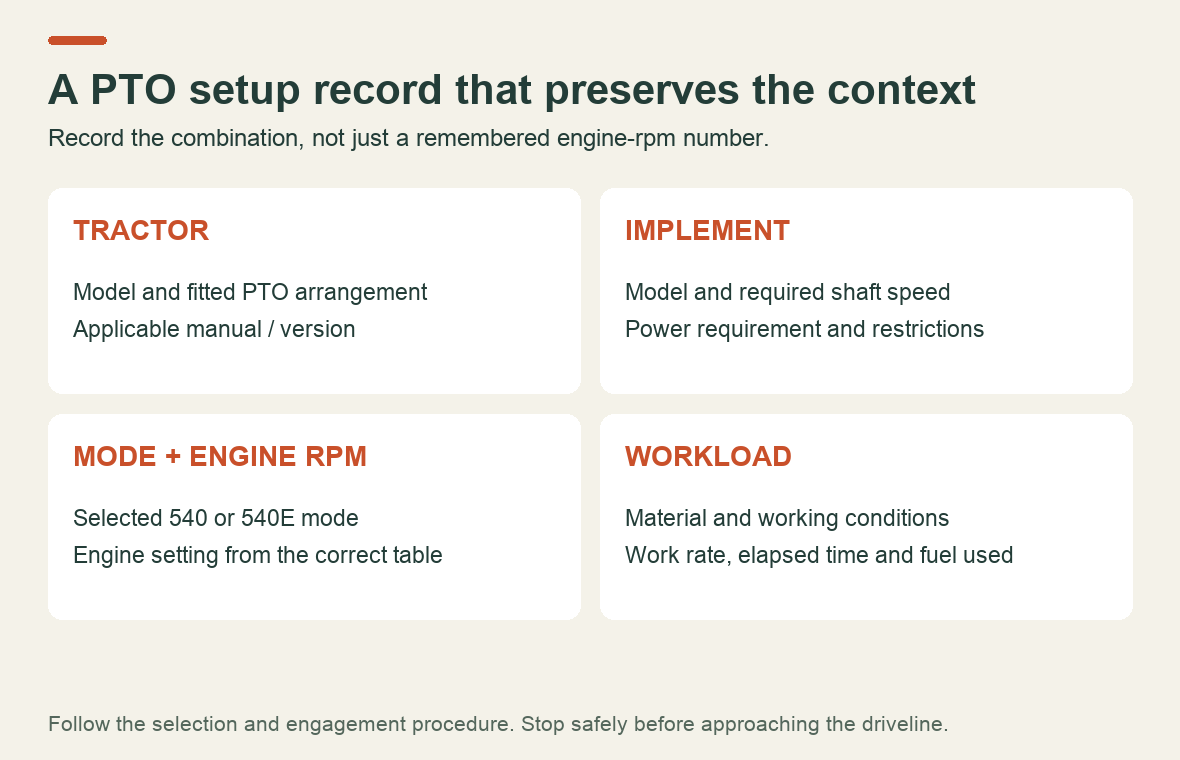
Two entries in your own record prevent a surprisingly easy mistake: “selected PTO mode” and “engine rpm for 540 PTO rpm in that mode.” Writing only “run at 1,535” loses the information that makes the number meaningful.
Simply lowering the throttle while leaving a conventional PTO in standard 540 does not select economy gearing. It reduces the shaft speed too. Likewise, do not carry the standard-mode throttle setting into economy mode: follow the economy-mode limit and speed indication to avoid overspeeding the implement.
When does 540E make sense?
Start with the implement manual, then consider the actual workload. “Mower” alone is not a sufficient answer: the width, material and operating conditions matter. These are planning examples, not approvals for a particular tractor–implement combination.
| Situation | What to establish before choosing economy mode |
|---|---|
| Maintaining grass with a compatible mower | Whether the tractor has adequate power reserve at the economy setting throughout the cut |
| Running a compatible sprayer or spreader | Required input speed, power demand and any manufacturer restriction on economy operation |
| Mowing dense, wet or unfamiliar material | Whether the load is too demanding or variable for the lower engine-speed setting |
| Using a PTO generator | Required input speed and its stability as electrical load changes; check both manuals |
An implement can need full shaft speed while requiring relatively little power. That is the useful opportunity for 540E. Conversely, a machine that needs substantial PTO power does not become a light-duty application because it can be connected to the same shaft.
If the engine cannot maintain the required speed under load, do not compensate by exceeding the economy-mode rpm limit. Reduce the workload or stop and follow the prescribed procedure to select the appropriate mode. Persistent poor performance also deserves investigation; a different selector position is not a repair.
Does 540E always save fuel?
There is a sound reason to consider it: New Holland describes the TD5 economy option as reducing fuel use and noise. But that is not a measured fuel-saving percentage for your work.
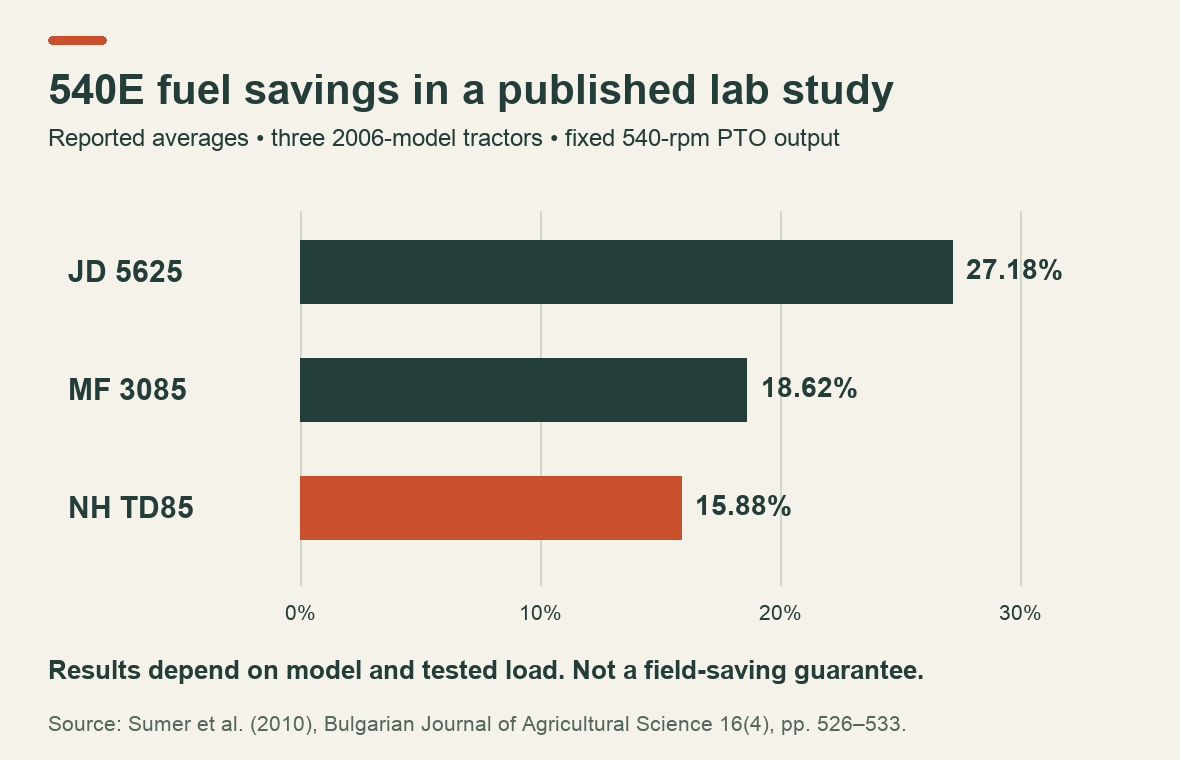
There is also published experimental evidence. Sümer and colleagues' 2010 laboratory study tested three 2006-model tractors with a PTO dynamometer while holding shaft speed at 540 rpm. It reported average savings with economy mode of 27.18% for the JD 5625, 18.62% for the MF 3085 and 15.88% for the NH TD85. Savings decreased as PTO load increased.
Those are results from the tested machines and load steps, not promised savings for a current tractor or an instruction to run a particular implement in economy mode.
To make a useful comparison, record the same implement, area or quantity of work, material conditions, elapsed time and fuel used. Include time lost to reduced work rate or stoppages. Compare fuel per completed job as well as fuel per hour.
Do not put a percentage on the saving from engine rpm alone. A 20% reduction in rpm, for example, is not evidence of a 20% reduction in fuel consumption. No field fuel test was performed for this article.
New Holland T5000: several PTO features, different purposes
The manufacturer's T5000 brochure, hosted by FarmingUK, describes 540/540E arrangements, a 1,000-rpm option and ground-speed PTO availability. Check the actual specification: optional equipment listed for a series does not identify what a used tractor has.
The brochure also describes Soft Start engagement. That concerns how drive is taken up. It does not select the implement's operating speed. Keep these questions separate when checking a machine: which speed range is fitted, how the clutch engages, and whether any ground-speed function is present.
This matters when an advert calls a tractor “two-speed PTO.” Ask which two speeds it means before assuming one is 540E.
Before changing the setting or approaching the driveline
Use the operator manual's selection and engagement procedure. Do not move a speed selector under load unless the manufacturer explicitly permits the operation.
The UK Health and Safety Executive's PTO safety guidance covers guarding, incorrect shaft speed and safe stopping. For a blockage, disengage the drive, apply the parking brake, put controls in neutral, stop the engine, remove the key and wait for all movement to stop before approaching. A slowing shaft still presents a hazard.
Which manual answers which question?
For routine use, locate the tractor operator manual's PTO section and the implement's operating instructions. For a fault, identify the fitted PTO arrangement before choosing service documentation.
If you are working on a T5030, T5040, T5050, T5060 or T5070, Byte Market lists the New Holland service manual 87679925A. Its contents include a dedicated power take-off section. Check the model, publication details and relevant section before buying; a service manual serves a different purpose from the operator's instructions for selecting 540E.
Prepared by Byte Market Editorial from the documentation linked above. The operating examples are editorial comparisons, not reports of machine tests.
Recent Post
-
Why a Kubota Manual May N...
16 Sep, 2026
-
Kubota Tractor Won’t Star...
16 Sep, 2026
-

Kubota DPF Light Flashing...
18 Sep, 2026
-
Kubota Tractor Overheatin...
21 Sep, 2026
-
Kubota Hydraulic Couplers...
22 Sep, 2026
-

Kubota UDT vs Super UDT2:...
23 Sep, 2026
-
Kubota 3-Point Hitch Won'...
24 Sep, 2026
-
Kubota Excavator Track Te...
25 Sep, 2026
-
New Holland540 vs 540E PT...
28 Sep, 2026
-
Kubota BX Mower Cutting U...
29 Sep, 2026
-
Kubota Excavator Controls...
30 Sep, 2026
-
New Holland DEF Storage:...
01 Oct, 2026
-

Kubota Air Filter: When t...
02 Oct, 2026
-
Kubota SVL Standard vs Hi...
06 Oct, 2026
-
New Holland Water in Fuel...
07 Oct, 2026
-
Kubota Loader Float: What...
08 Oct, 2026
-
Kubota HST Tractor Won't...
09 Oct, 2026
-
Kubota 50-Hour Service Ch...
12 Oct, 2026
-
Kubota 4WD Won't Disengag...
13 Oct, 2026
-
Kubota KX040-4 Final Driv...
14 Oct, 2026
-
Kubota PTO Won't Engage?...
15 Oct, 2026
-
How to Check Hydraulic Oi...
16 Oct, 2026
-
Kubota Battery Light Stay...
19 Oct, 2026
-
Kubota Ran Out of Diesel?...
20 Oct, 2026
-

Kubota SVL75-3 Lift Capac...
21 Oct, 2026
-
What Coolant Does a Kubot...
22 Oct, 2026
-
Kubota Engine Oil Level R...
23 Oct, 2026
-

Kubota SVL75-2 DPF Light...
26 Oct, 2026